I've started looking for artists for my scrolling shooter. I've got a couple people who are interested and their art seems very good. I'm putting together a short gameplay video to let them see what kind of stuff they will be getting into. I feel like graphically this is a pretty big project and I want to make sure any artist working on it has a feel for what they're getting themselves into.
Additionally, with the whole Flappy Birds craze going on right now, my brother Eric convinced me to make a clone. It's a very simple game so it only takes a couple days to get going, but it was a fun little exercise and I could put my own little twist on the game. Now Eric is playing around with some graphic tools and he's going to try and make some graphics for the game. Its pretty fun, but the concept of the original and all the numerous clones are simple in general and it's hard to screw up. I like it, it was fun to play around with, and when my brother gets some graphics finished up we'll put it on Google Play and we'll see if anybody wants to take a look.

Showing posts with label scrolling shooter. Show all posts
Showing posts with label scrolling shooter. Show all posts
Sunday, February 23, 2014

Friday, February 7, 2014
Helpful Tips and Flawless Victories
Continuing with my scrolling shooter changes, I've made several level changes and hopefully fixed a bug or two. The in-app billing seems to be working well and it has been tested on several devices, so I'm pretty excited.
A couple of the minor, but interesting, changes I have made are the tips and the flawless victory bonus. The tips are just general hints for the player such as suggesting that they pick up powerups even if they don't need them (i.e. health powerup when at full health) because they are still worth points. My brother and I have around 6 hints we've thought of so far. They show up on the level select page just under the high score listings for each level.
I also wanted to put in a bonus the player gets if they complete the level without taking damage, which is fairly standard. My brother suggested the bonus be called a "Flawless Victory" bonus, and being a huge Mortal Kombat fan, that's what I've named it as a bit of an homage. It is pretty straight forward: if you complete the level without taking any damage, you are awarded an additional 500 points. It doesn't count if you take damage and then collect a health powerup and end the level at full health. You have to survive the whole thing without getting hit.

The only things I have left (that I can think of) with the game are little settings type things like this. I added a button to the settings page so that player can turn off device vibration when they take damage. I need to make the button for the gantlet mode look different when it is available. I need to get some basic AdMob stuff in there (this will go away once the player unlocks the full version). Otherwise, though, it is looking fairly complete. I'm going to have to start searching around for an artist willing to take on such a large project very soon.
A couple of the minor, but interesting, changes I have made are the tips and the flawless victory bonus. The tips are just general hints for the player such as suggesting that they pick up powerups even if they don't need them (i.e. health powerup when at full health) because they are still worth points. My brother and I have around 6 hints we've thought of so far. They show up on the level select page just under the high score listings for each level.
I also wanted to put in a bonus the player gets if they complete the level without taking damage, which is fairly standard. My brother suggested the bonus be called a "Flawless Victory" bonus, and being a huge Mortal Kombat fan, that's what I've named it as a bit of an homage. It is pretty straight forward: if you complete the level without taking any damage, you are awarded an additional 500 points. It doesn't count if you take damage and then collect a health powerup and end the level at full health. You have to survive the whole thing without getting hit.
The only things I have left (that I can think of) with the game are little settings type things like this. I added a button to the settings page so that player can turn off device vibration when they take damage. I need to make the button for the gantlet mode look different when it is available. I need to get some basic AdMob stuff in there (this will go away once the player unlocks the full version). Otherwise, though, it is looking fairly complete. I'm going to have to start searching around for an artist willing to take on such a large project very soon.
Sunday, January 26, 2014
In-App Billing and Testing
My main focus of my projects recently has been getting In-App billing working in the scrolling shooter. I've been right on the cusp of having it working properly. Several times in the past week I got into it, lost track of time, and ended up staying up far too late and was wiped out at work the next day. However, I'm about 90% confident that I now have it working. Initially, the player has free access to the first two levels. They have to beat the first level to open up the second level, of course, and then anybody can get the third level by using the in game link to like Downplay Games on facebook. So really, there are three free levels in the game. To unlock the other 10 (plus the gauntlet mode I mentioned in my previous post) they have to buy the full version. On the main menu screen there is a "Buy Full Version" button that takes you to a Google Play purchase pop up and once you fill out all that, it unlocks the full version. At that point, of course, the player can play all 10 levels, but they still need to beat all the previous levels. So to get to level 10, you need to complete levels 1-9.
I've actually had the purchasing of the full version implemented for a long time. What I've been struggling with is the functionality to actually query Google Play and confirm that the full version is in fact purchased. So users could buy the game, but the game didn't know that they had and nothing unlocked as a result. My preliminary tests are very positive.
This week I purchased two new android phones from a craigslist posting to test on. Well, I gave Tia money and she bought them for me while I was at work, so big thanks to her for that! Anyway, with two more test phones I've been able to test the in-app billing pretty well. It's very hard to do, because first of all, you can test purchasing with your developer account, so my main phone is out. Then, on top of that, once you buy the full version on a test phone that does work, you can't test it on that phone again without a huge time consuming hassle. To repeat test on a phone, you have to refund and cancel the order via google wallet, then wait about 3 days for google to actually process all these changes (during which time the test account retains the full version) until finally things are set back up. Very annoying with only a single test phone to test, wait three days, test again. Now I have 3 test phones though so less of a hassle, but still a hassle. I tested the purchasing with my first test phone before I had the purchase state querying working fully, so that didn't work. Luckily it was pretty solid by the time I got around to testing on my new phones, so things appear to be working well.
As a bonus, I've rooted one of the new test phones and bought a screen recording program that runs smoothly on it so I can finally take videos of games for youtube trailers and such. Before, we had the same program on a rooted phone of Tia's that I was borrowing, but I've had it for like a year, and now I could finally give it back to her since I have the video capture stuff covered on my own now.
Now I just need to do a little more testing of the in app billing stuff, and tweak a few gameplay things, plus add a few options to the settings page (toggle off vibration when the player takes damage). Now that in app billing is looking solid, I think I'm finally ready to start trying to find an artist since there isn't any major hurdles left in the project.
I've actually had the purchasing of the full version implemented for a long time. What I've been struggling with is the functionality to actually query Google Play and confirm that the full version is in fact purchased. So users could buy the game, but the game didn't know that they had and nothing unlocked as a result. My preliminary tests are very positive.
This week I purchased two new android phones from a craigslist posting to test on. Well, I gave Tia money and she bought them for me while I was at work, so big thanks to her for that! Anyway, with two more test phones I've been able to test the in-app billing pretty well. It's very hard to do, because first of all, you can test purchasing with your developer account, so my main phone is out. Then, on top of that, once you buy the full version on a test phone that does work, you can't test it on that phone again without a huge time consuming hassle. To repeat test on a phone, you have to refund and cancel the order via google wallet, then wait about 3 days for google to actually process all these changes (during which time the test account retains the full version) until finally things are set back up. Very annoying with only a single test phone to test, wait three days, test again. Now I have 3 test phones though so less of a hassle, but still a hassle. I tested the purchasing with my first test phone before I had the purchase state querying working fully, so that didn't work. Luckily it was pretty solid by the time I got around to testing on my new phones, so things appear to be working well.
As a bonus, I've rooted one of the new test phones and bought a screen recording program that runs smoothly on it so I can finally take videos of games for youtube trailers and such. Before, we had the same program on a rooted phone of Tia's that I was borrowing, but I've had it for like a year, and now I could finally give it back to her since I have the video capture stuff covered on my own now.
Now I just need to do a little more testing of the in app billing stuff, and tweak a few gameplay things, plus add a few options to the settings page (toggle off vibration when the player takes damage). Now that in app billing is looking solid, I think I'm finally ready to start trying to find an artist since there isn't any major hurdles left in the project.
Sunday, January 12, 2014
Finishing Up the Scrolling Shooter
I've been finishing up some last details with my arcade scrolling shooter. My brother has been play testing it and we've been tweaking the difficulty of things and adding some gameplay changes that were needed. Nothing major, but collectively a lot of changes. One thing I did add that is significant is a new game mode that is unlocked once the player unlocks all the normal levels. This new mode is kind of a gauntlet that pits the player against enemies from all the levels all together, one after another. I think it's pretty fun.
One thing I still want to do is to add a simple text area on the level select screen that gives the players general tips and suggestions about how to play the game. I'm going to try to thing of some tips and then throw them all in a string file, then randomly grab one from there and use it to populate the text when the level select screen is created.
Additionally, I'm excited to get working on the in app billing for the game. This will be the first game that I've done that has just a single version. My previous games and apps have had a Lite version and a Full version. I'm working on getting Google's in app billing to work where the game comes with 2 or 3 levels initially and then the user can purchase the rest. This is something I've wanted to work on for quite a while, but due to some weird restrictions with Google play, I can't test in app purchasing with my developer account and I cant change the account that's tied to my phone without doing a factory reset, which I've been unwilling to do. The reason I'm excited now is that I recently got a new phone and so my old phone has just become a test device. I haven't done the factory reset on it yet, but once I am sure that all my content there is backed up, I'm going to reset it and set it up with a test account email and then I will be able to get things finalized. I tested the purchasing with my brother's phone and it successfully allows you to buy the full version, but right now that doesn't actually do anything because I haven't actually coded in any level restrictions based on the state of the player's purchases. It's not something I'm worried about though. Shouldn't take too long to get things set up how I want them once I get around to it. Things are looking good for the game but now I need to start looking for an artist to come on board and help me out with making things look good.
One thing I still want to do is to add a simple text area on the level select screen that gives the players general tips and suggestions about how to play the game. I'm going to try to thing of some tips and then throw them all in a string file, then randomly grab one from there and use it to populate the text when the level select screen is created.
Additionally, I'm excited to get working on the in app billing for the game. This will be the first game that I've done that has just a single version. My previous games and apps have had a Lite version and a Full version. I'm working on getting Google's in app billing to work where the game comes with 2 or 3 levels initially and then the user can purchase the rest. This is something I've wanted to work on for quite a while, but due to some weird restrictions with Google play, I can't test in app purchasing with my developer account and I cant change the account that's tied to my phone without doing a factory reset, which I've been unwilling to do. The reason I'm excited now is that I recently got a new phone and so my old phone has just become a test device. I haven't done the factory reset on it yet, but once I am sure that all my content there is backed up, I'm going to reset it and set it up with a test account email and then I will be able to get things finalized. I tested the purchasing with my brother's phone and it successfully allows you to buy the full version, but right now that doesn't actually do anything because I haven't actually coded in any level restrictions based on the state of the player's purchases. It's not something I'm worried about though. Shouldn't take too long to get things set up how I want them once I get around to it. Things are looking good for the game but now I need to start looking for an artist to come on board and help me out with making things look good.
Saturday, November 30, 2013
More Refactoring and Progress Meter Fix
Haven't been doing much lately that is interesting gameplay wise. Just some more refactoring of my vertical scrolling arcade shooter. Previously I was setting up all my textures for minions in my main game class but after the refactor the texture code for each individual minion is now in the minion class itself. Additionally, I made it so all my minions are set in a certain size since I never ended up making them different sizes anyway. As a result, my constructors for my minions have shrunk significantly in number of arguments required and everything is getting even more self contained. I've also been going through all of my classes and fixing some naming conventions that I had used when first starting the project that I'm no longer particularly fond of. Again, as this is a refactor, a person playing the game would not actually notice anything different about the game.
One thing I've done that isn't a refactor, however, is to fix the level progress meter on the side of the screen. The way it was setup originally was never really great, but it was close enough for what I originally wanted it to do. After I changed up the levels a while back to include waves that were a mix of the two minions of the level, the progress meter code broke down. Yesterday I looked into it for 15 minutes or so and now the progress meter is working even better than it was before it was broken, so I'm pretty happy with the outcome there.
Besides more refactoring and minor performance tweaks, the scrolling shooter is basically how I want it to be now. I just need to get some in-app purchasing going, but for weird Google related reasons, I can't really test any of this stuff without a new test phone. Conveniently though, I'll be getting a new phone soon, so I can do a factory reset on my current one and use that for testing, so I'm pretty excited about that. Once the in-app billing stuff is taken care of, I can start looking around for artists that might be interested in working on the game. I'm a little worried that people might not be into it though as it seems like a very large project with a bunch of animated sprites. Over 20 different minion types that all need to have animations. That seems like a pretty daunting task, but I'm hoping to find somebody who is up to the task because I think its a fun game already and when it looks good as well, it will be really solid.
One thing I've done that isn't a refactor, however, is to fix the level progress meter on the side of the screen. The way it was setup originally was never really great, but it was close enough for what I originally wanted it to do. After I changed up the levels a while back to include waves that were a mix of the two minions of the level, the progress meter code broke down. Yesterday I looked into it for 15 minutes or so and now the progress meter is working even better than it was before it was broken, so I'm pretty happy with the outcome there.
Besides more refactoring and minor performance tweaks, the scrolling shooter is basically how I want it to be now. I just need to get some in-app purchasing going, but for weird Google related reasons, I can't really test any of this stuff without a new test phone. Conveniently though, I'll be getting a new phone soon, so I can do a factory reset on my current one and use that for testing, so I'm pretty excited about that. Once the in-app billing stuff is taken care of, I can start looking around for artists that might be interested in working on the game. I'm a little worried that people might not be into it though as it seems like a very large project with a bunch of animated sprites. Over 20 different minion types that all need to have animations. That seems like a pretty daunting task, but I'm hoping to find somebody who is up to the task because I think its a fun game already and when it looks good as well, it will be really solid.
Wednesday, October 16, 2013
Refactoring and New Tweaks
Not a whole lot to report lately. I did a significant amount of refactoring over the past weekend however. Refactoring, by definition results in no real change in the way the client interacts with the code base. As such, the game seems to work in the same way it did before the refactoring, except behind the scenes it is now much more encapsulated after I pulled out a lot of the minion functionality out of the EnemyMinion class and into minion specific classes like Sprayer and and Exploder.
Though it isn't really significant, I made a minor tweak to the way the Boomerang class minion shoots. Previously it would shoot a bullet down that would make a U-Turn to the right side of the screen and then would proceed back up and off the screen. After my little change, there is now a 50/50 chance that the bullet will either U-Turn towards the left side of the screen rather than the right. Very minor tweak but it make the boomerang bullets a little less predictable as before you could just dodge to the left and not have to worry about the return hit.
That's all for now, but I've determined that in the platformer game, the levels need to be significantly more dangerous. At this point it seems far too easy to outrun the lava for long periods of time, and the lava pits aren't all that hard to avoid. It needs to be more of a challenge, but I'm still not sure what obstacles I could add to make it harder. Maybe something like a counterpart of the lava pit but on the ceiling so you can't jump too high. I'll have to keep thinking about that one.
Though it isn't really significant, I made a minor tweak to the way the Boomerang class minion shoots. Previously it would shoot a bullet down that would make a U-Turn to the right side of the screen and then would proceed back up and off the screen. After my little change, there is now a 50/50 chance that the bullet will either U-Turn towards the left side of the screen rather than the right. Very minor tweak but it make the boomerang bullets a little less predictable as before you could just dodge to the left and not have to worry about the return hit.
That's all for now, but I've determined that in the platformer game, the levels need to be significantly more dangerous. At this point it seems far too easy to outrun the lava for long periods of time, and the lava pits aren't all that hard to avoid. It needs to be more of a challenge, but I'm still not sure what obstacles I could add to make it harder. Maybe something like a counterpart of the lava pit but on the ceiling so you can't jump too high. I'll have to keep thinking about that one.
Friday, September 27, 2013
Minion Mixing and Results Popup
I haven't been working on too many projects recently, but I've made a couple improvements to some of my games. First off, in the scrolling shooter, I switched up some of the minion waves. Each level has two types of minions, and previously waves of minions would alternate between the first type and then the second type. Now, every once in a while there will be a wave that is a mix of the two minion types. Also, my cousin Mitch has been testing the shooter for me. I fixed one bug with the reset button he found and he's helping me get the difficulty of the levels more in line with what they should be sequentially. Here is a screenshot of the ghost level with both minion types in the same wave:

Additionally, I've been working on the platformer game and I've put in a results popup window when the level is over. It show how many points you got from collecting gems, how many you got from just surviving in the level, your total score, and what caused your death. It also shows how much distance you've traveled horizontally through the level. That doesn't really factor into your score but I'll probably use it for an achievement of some sort eventually. The popup box also has a "done" button that will close the window and set you up for the next game. Here are a couple screenshots of the results popups:


Additionally, I've been working on the platformer game and I've put in a results popup window when the level is over. It show how many points you got from collecting gems, how many you got from just surviving in the level, your total score, and what caused your death. It also shows how much distance you've traveled horizontally through the level. That doesn't really factor into your score but I'll probably use it for an achievement of some sort eventually. The popup box also has a "done" button that will close the window and set you up for the next game. Here are a couple screenshots of the results popups:


Saturday, August 24, 2013
Game Syncing and Thermometers
I've been working with the Google Play Game Services some more trying to get a player's unlocked levels to sync for accounts across different devices in the scrolling shooter. The Game Services have some cloud saving abilities, but after spending a lot of time trying (and failing) to get it working, I decided to go a different route. Google's documentation of the cloud saving services leaves a lot to be desired, and I found their one example of how to implement it to be a bit of a complicated mess. For my solution, I tried something else, and it is not what Google would ever intend for someone to do and it probably isn't very good practice, but it's working well for me. What I'm doing is when the player starts up a game, I use the Game Services API to get a buffer filled with all the available achievements for the account. Then I step through the buffer and record how many of the achievements are unlocked. Since in the scrolling shooter game, the only achievements will be for completing a level, the number of achievements that are unlocked for the account is the same number of levels completed. Obviously this method wouldn't work if I had achievements for other things like reaching a certain score or beating a level in a certain time, but I have no intention of adding any such achievements so this works out pretty well. The game has a saved preference of how many levels are unlocked, so after I get how many achievements the player has, I compare that to the saved value of unlocked levels. If the number of unlocked levels is less than the number of achievements, I update the unlocked levels to be correct for the account. If the max number of unlocked levels is already saved in the preferences then I don't have to check for this level syncing in the first place and I just avoid any unnecessary calls to the Game Services. It's not how Google intends for people to do things and it's a bit of a hack job, but it's also pretty solid and it seems to be working well, so I'm going to stick with it on this particular app.
In addition to working on the Game Services for my scrolling shooter, I've been adding a bit to my platformer as well. Just recently I added my "danger meter" to the HUD. Its a thermometer and it shows how close the lava wave chasing the player is. As the lava wave gets closer, the level of the thermometer rises, filling the gauge when the lava actually reaches the player. It's really nice because you now have a way of telling when the lava is getting close before it actually appears on the screen. For the most part, its easy to keep the lava far enough away that the thermometer is empty, but since the lava speed ramps up over time, it will eventually catch up and the level of the meter rising lets you know its coming.
Here are a couple screenshots of the thermometer in action:


In addition to working on the Game Services for my scrolling shooter, I've been adding a bit to my platformer as well. Just recently I added my "danger meter" to the HUD. Its a thermometer and it shows how close the lava wave chasing the player is. As the lava wave gets closer, the level of the thermometer rises, filling the gauge when the lava actually reaches the player. It's really nice because you now have a way of telling when the lava is getting close before it actually appears on the screen. For the most part, its easy to keep the lava far enough away that the thermometer is empty, but since the lava speed ramps up over time, it will eventually catch up and the level of the meter rising lets you know its coming.
Here are a couple screenshots of the thermometer in action:


Monday, August 19, 2013
Gem Collecting and Game Services
I've recently updated a little bit of my platforming game. It is entirely cosmetic but I've made it so when the player collects a gem, the gem shoots up into the top left corner where their score is. It isn't that big of a change, but I think I pulled it off pretty well and it definitely looks cool, especial when you collect a couple gems right in a row. I don't think any players will need the confirmation that they did, in fact, collect the particular gem, but I suppose that is an added benefit of having the gem in question slide up to their score text.
I've also been playing around with some of the new Google Play Game Services on the scrolling shooter. I've added a leaderboard and achievement for each level and a Google+ login button on the main screen. Things seem to be going pretty well. I also made it so you now start only with the first level and to unlock each level, you have to first beat the previous level. I might try to get some cloud saving going on since its a part of the Google Plus Game Services package, but the documentation isn't all that great so I might have to scrap it. Conceptually though it would be pretty cool to be able to beat a level on your phone and have it unlocked on say a tablet as well. I'm also going to look into some in-app purchases stuff. All my previous projects have just had a lite version and a full version but I want to start just releasing a single version with limited access and then you can make an in-app purchase to remove ads and unlock all content. So I'm going to be checking that out really soon.
I've also been playing around with some of the new Google Play Game Services on the scrolling shooter. I've added a leaderboard and achievement for each level and a Google+ login button on the main screen. Things seem to be going pretty well. I also made it so you now start only with the first level and to unlock each level, you have to first beat the previous level. I might try to get some cloud saving going on since its a part of the Google Plus Game Services package, but the documentation isn't all that great so I might have to scrap it. Conceptually though it would be pretty cool to be able to beat a level on your phone and have it unlocked on say a tablet as well. I'm also going to look into some in-app purchases stuff. All my previous projects have just had a lite version and a full version but I want to start just releasing a single version with limited access and then you can make an in-app purchase to remove ads and unlock all content. So I'm going to be checking that out really soon.
Tuesday, July 23, 2013
Platforming
I've been trying to think of things I want to add to the scrolling shooter, but with the addition of the story type slides to the beginning and end of the levels I think its almost finished up. So, in the last couple day I've started playing around with a new game concept. This time, I'm working on a platformer. I'm going for a dynamic/psuedo-random level design. To do this, I'm making different level sections, which I call "Sectors" that have the same entrance and exit space size. Then I can chain several sectors together to make levels that are different every time. The sectors will remain the same, and the player will see them multiple times, but with enough different sector types the levels should be unique every time. I need some sort of monster or enemy chasing the player through the level, but I'm not sure what to go with yet. Initially I was thinking something like lava flooding the level, and then I was thinking some sort of giant spider, but really I need to focus on some additional level things first. I only have 2 sectors that are being randomly placed right now but that seems to be working pretty well. It still needs a few tweaks but it's definitely good enough to show this game idea has potential.
Thursday, July 18, 2013
Sounds and Stories
Haven't done much that is noteworthy lately, but I have been tinkering with some stuff. In my puzzle game, I've been adding sound effects and getting that all ready. I already has some in place for a while, but they weren't quite playing in the right places. Now I've gotten it all set up and working properly. I'm thinking this game is all set up correctly now. I just need some music assets and such to throw in and it should be already for release.
I've also been adding in some story elements (or preparations for them) to the scrolling shooter. When a new level is started, before the player sprite enters the screen, a dialog type window will pop up on the screen that will eventually show some sort of story graphics. The player clicks on it, it shows the next one, they click the second one and it goes away and the player sprite enters. When the player beats the boss, another box pops up with the same kind of deal only when its over the player sprite leaves the screen. Each level will have 2 intro "slides" and 2 outro slides. When strung together in the order of the levels, this will hopefully create some sort of cohesive overarching storyline. I only have a vague and general idea of the direction of this story, but I don't think it will be too hard to figure out. I don't plan on making it anything complicated with plot twists or anything. I just want it to be pretty straight forward and maybe have some dialog between the player character and the enemy characters. I'm pretty happy with how its looking.
I've also been adding in some story elements (or preparations for them) to the scrolling shooter. When a new level is started, before the player sprite enters the screen, a dialog type window will pop up on the screen that will eventually show some sort of story graphics. The player clicks on it, it shows the next one, they click the second one and it goes away and the player sprite enters. When the player beats the boss, another box pops up with the same kind of deal only when its over the player sprite leaves the screen. Each level will have 2 intro "slides" and 2 outro slides. When strung together in the order of the levels, this will hopefully create some sort of cohesive overarching storyline. I only have a vague and general idea of the direction of this story, but I don't think it will be too hard to figure out. I don't plan on making it anything complicated with plot twists or anything. I just want it to be pretty straight forward and maybe have some dialog between the player character and the enemy characters. I'm pretty happy with how its looking.
Thursday, June 27, 2013
Zeemote Shooter
I've all (I think) of the commenting done on the puzzle game and now I'm trying to get a hold of a friend to possibly do some sound effects for it. Other than that, I've been working on the scrolling shooter a little bit. Mostly minor tweaks not worth mentioning, but also one big addition: Zeemote Support. Several months ago I bought a Zeemote JS1 Controller for the express purpose of adding support for it in my scrolling shooter. I was working on so many more important gameplay issues that I never got around to it, but I recently remembered my initial plan and started looking into it. Thankfully, the Zeemote is actually really easy to get started integrating and it didn't take an crazy amount of time to get it going.
I've added an option on the settings page to enable support of Zeemote bluetooth controllers. It required a little bit of refactoring, but its all set up. You use the joystick to move obviously, and either of the 2 front buttons to shoot. You can hold down the fire button to have it shoot continuously like it does in the normal touch mode, or you can actually wait and time your shots. In that respect, the Zeemote actually gives you an advantage, but, for me at least, the joystick also makes it harder to dodge bullets, although it is quite fun. You can't rapidly tap the fire button to shoot faster than normal though. You'll still have the same "attack speed" as a player not using the Zeemote. This just gives you a lot more control over when the bullet actually fires. I think its a fair trade off. I'm really happy with how its working out and I think its a great option to have in the game.


I've added an option on the settings page to enable support of Zeemote bluetooth controllers. It required a little bit of refactoring, but its all set up. You use the joystick to move obviously, and either of the 2 front buttons to shoot. You can hold down the fire button to have it shoot continuously like it does in the normal touch mode, or you can actually wait and time your shots. In that respect, the Zeemote actually gives you an advantage, but, for me at least, the joystick also makes it harder to dodge bullets, although it is quite fun. You can't rapidly tap the fire button to shoot faster than normal though. You'll still have the same "attack speed" as a player not using the Zeemote. This just gives you a lot more control over when the bullet actually fires. I think its a fair trade off. I'm really happy with how its working out and I think its a great option to have in the game.

Sunday, June 9, 2013
Flamethrowers and Fireballs
Level 10. The final level in the scrolling shooter game. This level is all about fire shooting drones. The two classes of minions are just named after their weapon type: the Flamethrower and the Fireball. The Flamethrower class does what you would think and shoots a flamethrower bullet out in front of it. Unlike other minion types the "flame" moves with minion as it flies around the screen. After a couple seconds, the flame is then shot down the screen like a normal projectile. The second class is the Fireball minion. These guys shoot bullets in a fairly normal fashion, except their projectile is a ball shape instead of the thinner rectangular shape other bullets are. Additionally, the fireball grows as it moves down the screen so they are pretty hard to dodge when they get near the bottom.


Tuesday, May 28, 2013
Dragons!
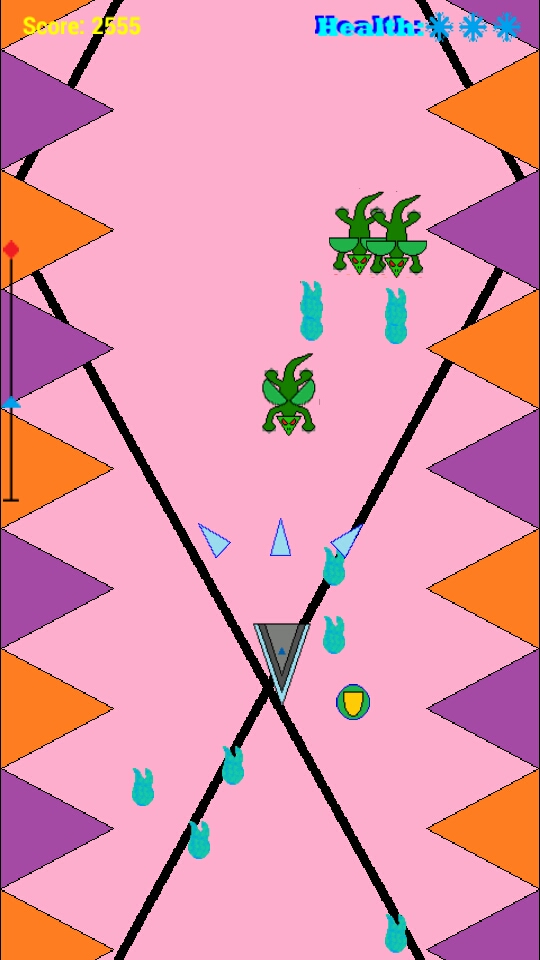
Level 9 of my scrolling shooter consists of the inevitable dragon minions. Hopefully, when there are some better graphics in the game, they will be pretty cool looking, but for now they are lizards with semi circle wings. The two dragon minion these: the guardian class the dragonfire class. The guardian minions are orange, and they shoot normal bullets (nothing special about them) but, unlike every other minion type in the game, they take two hits to kill. The first hit will turn the guardian a deeper red color, similar to how the player turns red for a second when they get hit, only the guardian doesn't change back. Once they are red, if they get hit again they are killed. So, they are basically a normal minion with a little more beef. The second class, the dragonfire, is a green dragon. The unique thing about these guys is that they shoot 2 bullets straight down, but one of them is at a much slower speed than the other, so when there are a few of them on the screen at once, you get a hard-to-dodge wall of bullets. Neither of these minion types are quite as exciting as some of the ones from previous levels, but they are actually pretty hard to deal with.


Wednesday, May 8, 2013
Genies and Tornadoes
Back to my scrolling shooter. After my brother suggested a level with Genie characters, I came up with what is currently Level 8. As always, there are two minion classes, both genies, and they shoot tornadoes in different ways. The Cyclone class shoots a tornado straight down, similar to many other minions in the game, but once it reaches a certain distance from its origin point, it breaks into 2 tornadoes that go off at different angles. Its kind of a mix of bullet behaviors from previous levels. The second class of minion on this level is the Seeker class. The tornado bullets they shoot actually have decent homing capabilities. They will travel down the screen at a set speed, but will change direction horizontally to go towards the player. This results in the player often needing to move up the screen to get the bullets behind them. It can be pretty challenging if you don't clear the seeker minions out fast enough. Below are some screenshots of my beautiful genie minions and yet another boring placeholder background (the tan triangles are supposed to be something akin to a tornado or dust devil).


Monday, May 6, 2013
Tutorials and Roulette
Recently I released a new app called the Lucky Roulette Picker. This was just a little app I thought of one night and pumped out the next day. It's basically a random number generator that picks what you should bet on in a game of casino style roulette. It generates a choice for the possible options in the 1-to-1, 2-to-1, and 35-to-1 payout areas of the board. It is a free only app with an ad at the bottom. It's super simple and it only took me a day to make, so selling it wouldn't work out too well. Still, its a funny little app and, as a fan of roulette, I'm pretty happy with it. The Lucky Roulette Picker is available Google Play:


Additionally, I've been working on my scrolling shooter some more. Of course it needs a "How to Play" section for people to learn how the game works. I think most people will pick it up quickly because its nothing revolutionary, but people that aren't super familiar with arcade style scrolling shooters might need a refresher. In my other games, the how to play sections have just been simple slideshow type deals where you scroll through the instructions until you get to the end. However, this tutorial I'm pretty proud of. Its an active tutorial and you have to participate in the basic elements of the game to advance. The first stage requires you to move to two markers on the screen, the second part has you shoot two stationary targets. Then you have to shoot two moving minion (that don't shoot back). Then the tutorial shows how taking damage works and you have to take a hit from another minion to advance. After that, it walks you through how the powerups work and you have to collect one of each. Finally, it describes how the boss battles are triggered and has you defeat a boss that doesn't move or shoot, but this illustrates how the boss bar works and such. After that, it will start you out on the first level. I'm really happy with how it works and I think it will help a lot of new players.


Additionally, I've been working on my scrolling shooter some more. Of course it needs a "How to Play" section for people to learn how the game works. I think most people will pick it up quickly because its nothing revolutionary, but people that aren't super familiar with arcade style scrolling shooters might need a refresher. In my other games, the how to play sections have just been simple slideshow type deals where you scroll through the instructions until you get to the end. However, this tutorial I'm pretty proud of. Its an active tutorial and you have to participate in the basic elements of the game to advance. The first stage requires you to move to two markers on the screen, the second part has you shoot two stationary targets. Then you have to shoot two moving minion (that don't shoot back). Then the tutorial shows how taking damage works and you have to take a hit from another minion to advance. After that, it walks you through how the powerups work and you have to collect one of each. Finally, it describes how the boss battles are triggered and has you defeat a boss that doesn't move or shoot, but this illustrates how the boss bar works and such. After that, it will start you out on the first level. I'm really happy with how it works and I think it will help a lot of new players.
Wednesday, April 24, 2013
Deflector Shields and Lasers
Level 7 of my scrolling shooter game has laser satellite minions. The first type is the "waveshot" class. These minions shoot like other normal minions, except their bullets are wider, laser waves. Basically their bullets are just like the normal bullets in other levels, but rotated 90 degrees. The second minion class is the "reflector". These guys occasionally put up a laser shield in front of themselves and when a player bullet hits the shield, it is reflected back towards the player as an enemy bullet. The reflectors are pretty hard because they shoot their own bullets, plus reflect your own bullets back at you. It can get pretty hectic if there are a lot of reflectors going. Here are a couple screenshots of that level, still with one of my awful test backgrounds:


Sunday, April 21, 2013
Disc Golf and Lignting Bolts
I just recently released a new app called Disc Golf Cataloger. It's extremely similar to my previously released Nail Polish Cataloger, except that it is an app that I will actually use. Developing it also led to some cool new features in both the disc golf and the nail polish app. I added in some stuff people were asking for, like the ability to add notes to entries or sort by things like brand instead of just name. I also added some auto-backup things to make sure you don't lose your catalog. So, that's available now on Google Play:
Now, on to details about Level 6 of my scrolling shooter. This one is a lightning themed level. I'm not 100% sure what the minions will be visually, but they are currently angry storm clouds in my programmer art version. It's very intense... Anyway, the first minion class is called the "Zigzag", because when they shoot their bullets, the bullets zigzag back and forth down the screen. They are actually pretty hard to dodge if there are more than just a few. The second minion class is boringly named the "Pauser" because when they fire a bullet, it pauses for a short duration at its origin point before quickly shooting down the screen. When there are multiple pausers flying around you end up getting this big section of lightning bullets that are just waiting at the top of the screen, and then they all swarm down on you. It's actually pretty cool, I'm just disappointed that I didn't use a better minion class name, but that isn't really important. Here are some pictures of my awful storm cloud minions with my terrible recolored test background that should illustrate just how little I cared about making the graphics for this level:

 So, that is level 6. I'm actually currently working on the last level since I finally came up with some minion ideas for it. Levels 7, 8, and 9 are already done so I will post about those in the future.
Now, on to details about Level 6 of my scrolling shooter. This one is a lightning themed level. I'm not 100% sure what the minions will be visually, but they are currently angry storm clouds in my programmer art version. It's very intense... Anyway, the first minion class is called the "Zigzag", because when they shoot their bullets, the bullets zigzag back and forth down the screen. They are actually pretty hard to dodge if there are more than just a few. The second minion class is boringly named the "Pauser" because when they fire a bullet, it pauses for a short duration at its origin point before quickly shooting down the screen. When there are multiple pausers flying around you end up getting this big section of lightning bullets that are just waiting at the top of the screen, and then they all swarm down on you. It's actually pretty cool, I'm just disappointed that I didn't use a better minion class name, but that isn't really important. Here are some pictures of my awful storm cloud minions with my terrible recolored test background that should illustrate just how little I cared about making the graphics for this level:


Friday, March 29, 2013
Robot Birds and Razor Blades
I've made a couple more levels in my scrolling shooter game, but for now I'll just go over what is currently the 5th level. In this level, the enemies are robot birds. There is the "Layer" class and the "Boomerang" class of minion. The Layer gets its name because when it is killed, it leaves behind (or lays) a robot egg pod thing. The player must kill this also or in 3 seconds it hatches into a miniature version of the Layer called a Hatchling. With the Boomerang class, their projectiles are quite unique for minions in the game. They shoot out their spinning razor blade bullets, which go out to a specific distance from the bottom of the screen and then hook back and leave the screen at the top. Basically the bullets follow a tight, long U shaped path and if you aren't paying attention, you can get hit by the returning bullet that you previously dodged. Overall I'm pretty happy with this level. The enemies are unique and it is pretty challenging. Right now it is only level 5 (I want to get at least 10 levels in the game upon release) but I think I might have to move it back to be later in the game on account of the difficulty level. Below are some pictures of my crappy MS Paint robot birds (the background is my crappy test background


Friday, March 22, 2013
Pink and Yellow Ghosts
So, I've been doing some more work on the game, but I haven't added in that level select menu. I have, however, I've completed my ghost level. There are two types of ghost minions, as with all other levels. The first ghost minion class is called the "Fader" and it is currently a pink guy that shoots normal bullets, but the thing with him is that he is in his transparent white/invulnerable mode most of the time, so you have to wait until he 'materializes' to kill him. It really just becomes an exercise in timing to take these guys down. The second minion is the "Confuser" class ghost and they look similar to the Faders but they are yellow. These guys shoot normal bullets like the Fader, but they also shoot a yellow confuse ray bullet. These bullets don't damage the player, but it applies the "confusion" debuff I added to the game.
The Confusion debuff screws with the player's controls. It turns the player a yellow hue so you know whats going on, but it also reverses the player's control in the X direction. So, if your finger is on the right side of the screen, your player sprite will be on the left. It doesn't mess with your controls in the Y direction though. That would be too mean. The confusion lasts for like 3 seconds and then it wears off. You get a half-second shield at the beginning and end of the confusion, just as a courtesy so that the sudden change in location of your sprite doesn't make you run into 5 bullets on the other side of the screen. Below are a couple screenshots of the new minions.


There's also a quick graveyard/fog background going on, but hopefully it will be something cooler in the final version. I still want to get a few more of my level ideas completed, but I really should start working on the level select menu I've talked about. These levels are starting to pile up and even though I can skip through them, its still kind of annoying when I need to test the same level repeatedly. I'll see if I can resist the urge to add more minion types and actually get some menu work done.
The Confusion debuff screws with the player's controls. It turns the player a yellow hue so you know whats going on, but it also reverses the player's control in the X direction. So, if your finger is on the right side of the screen, your player sprite will be on the left. It doesn't mess with your controls in the Y direction though. That would be too mean. The confusion lasts for like 3 seconds and then it wears off. You get a half-second shield at the beginning and end of the confusion, just as a courtesy so that the sudden change in location of your sprite doesn't make you run into 5 bullets on the other side of the screen. Below are a couple screenshots of the new minions.


There's also a quick graveyard/fog background going on, but hopefully it will be something cooler in the final version. I still want to get a few more of my level ideas completed, but I really should start working on the level select menu I've talked about. These levels are starting to pile up and even though I can skip through them, its still kind of annoying when I need to test the same level repeatedly. I'll see if I can resist the urge to add more minion types and actually get some menu work done.
Subscribe to:
Posts (Atom)